


Low-code and no-code development platforms are software tools that enable users to build applications with minimal or no hand-written code. Using visual interfaces, drag-and-drop components, reusable modules, and prebuilt integrations, these platforms simplify application development and help businesses deliver software solutions more efficiently.
Although both approaches reduce the need for traditional coding, they serve different needs. Low-code development platforms allow developers to add custom code when required, making them suitable for applications that need advanced functionality, integrations, and greater flexibility. No-code development platforms enable business users and non-technical teams to create applications using visual development tools without writing code.
Table of Contents
What Is Low-Code Development?
Low-code development is an approach to software development that uses visual interfaces, reusable components, templates, workflow designers, integrations, and automation to reduce the amount of hand-written code required to build an application.
Unlike no-code development, low-code platforms generally allow developers to add custom code when the application’s requirements go beyond the platform’s built-in capabilities.
A low-code application can therefore combine:
- Visual application builders
- Prebuilt UI components
- Reusable business logic
- Workflow automation
- Database and data models
- API integrations
- Authentication and access controls
- Custom code
- Testing and deployment tools
- AI-assisted development features
This makes low-code useful for both professional developers and business users working with IT teams.
Low-code does not eliminate software engineering. Instead, it changes where developers spend their time. Developers can use platform components for common functionality while applying custom code and engineering practices to areas that require greater control.
For enterprise applications, this distinction matters. Complex integrations, security requirements, custom business logic, performance requirements, and regulatory controls can still require professional development expertise.
Organizations that need applications beyond the limits of a low-code platform can also combine it with Custom Software Development Services to build specialized functionality and integrations.
What Is No-Code Development?
No-code development allows users to create applications primarily through visual interfaces without writing traditional programming code.
No-code platforms generally provide prebuilt components, templates, forms, workflow rules, databases, integrations, and other configurable building blocks. Users define what the application should do through configuration rather than implementing the underlying software logic manually.
Typical no-code users include:
- Business analysts
- Operations teams
- Marketing teams
- Sales teams
- HR teams
- Finance teams
- Product teams
- Citizen developers
- Small business owners
Common no-code applications include internal forms, approval workflows, simple portals, dashboards, data collection tools, employee applications, and department-specific workflow applications.
The main advantage is accessibility. Someone without formal programming experience can create a useful application without becoming a full-time software developer.
However, no-code also introduces constraints. Users are generally limited to the components, integrations, data models, and customization options provided by the platform.
How Do Low-Code And No-Code Work?
Traditional application development usually requires developers to design the architecture, write source code, connect services, build interfaces, test functionality, and manage deployment.
Low-code and no-code platforms abstract some of these activities behind visual development environments.
A typical workflow looks like this:
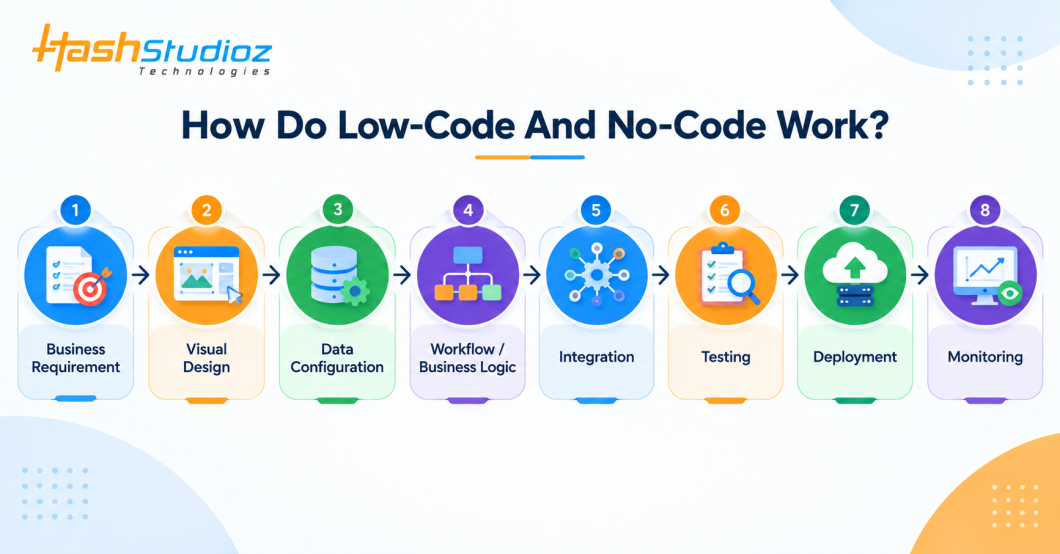
Instead of manually implementing every component, users select and configure reusable building blocks.
For example, an internal employee-request application might include:
- A form for submitting a request
- A database or connected data source
- Approval rules
- Notifications
- Role-based access
- Reporting
- Integration with an existing business system
A no-code platform may provide these capabilities entirely through configuration. A low-code platform can provide the same foundation while allowing developers to add custom logic or integrations where required.
Modern platforms increasingly combine low-code development with AI assistance. Microsoft, for example, now supports natural-language and AI-assisted capabilities alongside visual application development.
When applications require broader integration, migration, or modernization, organizations may combine low-code development with Web Application Development Services or custom backend engineering.
Why Are Businesses Adopting Low-Code and No-Code Development?
Organizations use low-code and no-code development to accelerate application delivery, streamline business processes, improve productivity, and reduce dependence on lengthy traditional development cycles. However, choosing the right platform requires evaluating factors such as customization, security, scalability, integration requirements, licensing costs, and vendor lock-in.
In this guide, we’ll explore how low-code and no-code development platforms work, compare their key differences, examine their benefits and limitations, review popular platforms, and discuss real-world use cases to help you choose the right approach for your business.
Low-Code vs. No-Code: What Is the Difference?
The two approaches share visual development concepts, but they target different levels of technical involvement and application complexity.
| Factor | Low-Code | No-Code |
|---|---|---|
| Primary users | Developers, IT teams, technical business users | Business users and citizen developers |
| Coding | Minimal coding; custom code may be available | No traditional coding required |
| Customization | Higher | More limited |
| Complex business logic | Better suited | Usually more limited |
| Integrations | APIs, connectors, and custom integrations | Primarily available connectors |
| Development speed | Fast | Very fast for suitable applications |
| Technical expertise | Helpful for advanced applications | Minimal |
| Application complexity | Medium to high | Low to medium |
| Governance | Important | Important |
| Platform dependency | Moderate to high | Often higher |
| Best suited for | Enterprise and departmental applications | Simple business applications and workflows |
The distinction is not absolute because platform capabilities vary. Some platforms offer both no-code and low-code experiences within the same development environment.
The more useful question for an enterprise is therefore not “Which technology is better?” but “Which development approach fits the application’s requirements, risk profile, and level of customization?”
Uses For Low-Code/No-Code Development Platforms
Organizations use low-code and no-code platforms for a broad range of business and operational applications.
Workflow Automation
Teams can digitize approval processes, employee requests, procurement workflows, service requests, and other repetitive processes.
Internal Business Applications
Organizations can create applications for HR, finance, operations, sales, procurement, compliance, and other departments.
Customer Service Applications
Low-code platforms can support customer-facing workflows, service requests, case management, portals, and internal service applications.
Data Collection and Forms
Organizations can replace paper-based or spreadsheet-based processes with structured digital forms connected to centralized data.
Legacy Application Modernization
Low-code platforms can provide new user interfaces and workflow layers around existing systems without requiring organizations to replace every legacy application immediately.
Mobile Business Applications
Field teams can use mobile applications for inspections, asset management, inventory, service operations, data collection, and reporting.
Process and Approval Management
Businesses can create automated workflows for purchasing, expense approvals, employee onboarding, compliance reviews, and other structured processes.
AI-Enabled Applications
Modern low-code platforms can also provide the foundation for applications that incorporate AI services, natural-language interfaces, and AI agents.
For more complex AI-enabled applications, organizations can combine low-code tools with AI and Generative AI Development Services for custom AI models, LLM applications, RAG systems, chatbots, and other AI capabilities.
Low-Code/No-Code Use Cases by Business Function
The technology can be applied across multiple enterprise functions.
| Business Function | Example Applications |
|---|---|
| Finance | Expense approvals, invoice workflows, financial requests |
| HR | Employee onboarding, leave requests, internal portals |
| Sales | Lead management, quote approvals, sales dashboards |
| Customer Service | Case management, service requests, knowledge workflows |
| Operations | Work orders, inspections, process tracking |
| Manufacturing | Production tracking, quality inspections, maintenance workflows |
| Logistics | Shipment tracking, fleet applications, delivery workflows |
| IT | Service requests, asset management, approval workflows |
| Compliance | Policy management, audit workflows, evidence collection |
| Procurement | Purchase requests, supplier workflows, approval systems |
The strongest use cases generally have clearly defined workflows, structured data, repeatable processes, and measurable operational outcomes.
For connected products and industrial workflows, low-code applications can also sit above IoT platforms and provide dashboards, alerts, workflow automation, and operational interfaces. This can complement IoT Development Services when organizations need an end-to-end connected solution.
Low-Code Development Platform Vendors
The low-code market now includes enterprise application platforms, workflow platforms, CRM platforms, business application platforms, and developer-oriented tools.
Examples include:
- Microsoft Power Apps
- Salesforce Platform
- ServiceNow App Engine
- Mendix
- OutSystems
- Appian
- Oracle
- SAP
- Creatio
- Retool
- Zoho
Gartner’s 2025 Magic Quadrant for Enterprise Low-Code Application Platforms, published in July 2025, evaluated 12 representative vendors, including Appian, Creatio, Mendix, Microsoft, Oracle, OutSystems, Pegasystems, Retool, Salesforce, SAP, ServiceNow, and Zoho. Gartner’s more recent 2026 research reflects the market’s shift toward AI-augmented low-code platforms and AI-agent development.
When evaluating a platform, enterprises should consider more than its visual development tools. Key factors include integration capabilities, security, governance, application lifecycle management, testing, deployment, data architecture, extensibility, licensing, and long-term platform strategy.
For organizations already using Salesforce, low-code capabilities can be extended through Salesforce Development Services when applications require custom objects, Apex, Lightning Web Components, integrations, automation, or other platform-specific development.
No-Code Development Platform Vendors
No-code capabilities are available across dedicated no-code tools and broader business application platforms.
Examples include:
- Microsoft Power Apps
- Zoho Creator
- Bubble
- Airtable
- AppSheet
- Salesforce Platform
- ServiceNow
- Creatio
Some vendors position their platforms across both no-code and low-code development. Therefore, the same platform may serve business users for simple applications while providing developers with more advanced capabilities.
When evaluating a no-code platform, organizations should examine the available data sources, integrations, authentication options, workflow capabilities, application limits, export options, governance controls, and pricing model.
Benefits Of Low-Code And No-Code Platforms
Low-code and no-code development can provide several business and engineering benefits when organizations apply them to suitable use cases.
Faster Application Delivery
Visual components and reusable services can reduce the amount of manual development required for common application functionality.
Greater Business and IT Collaboration
Business teams can participate more directly in application design and development while IT teams provide architecture, security, integration, and governance.
Better Use of Developer Capacity
Professional developers can spend less time implementing repetitive application features and more time on complex engineering problems.
Faster Process Digitization
Departments can digitize manual workflows without waiting for every small application request to enter a conventional development backlog.
Reusable Components
Many platforms support reusable components, connectors, workflows, and templates that can reduce repeated development work.
Faster Prototyping
Teams can create working prototypes earlier, validate requirements with users, and refine the solution before investing heavily in custom development.
Support for Citizen Development
Organizations can allow trained business users to create applications under defined governance policies.
When Should You Use Low-Code or No-Code Development?
The right approach depends on the application’s complexity, risk, integration requirements, available skills, and expected lifecycle.
Use No-Code When:
- The application has relatively simple requirements.
- Business users need to build or modify the application.
- The workflow relies mainly on standard components.
- Speed is a major requirement.
- Advanced customization is not necessary.
- The application is low-risk or departmental in scope.
Use Low-Code When:
- The application requires custom business logic.
- The solution needs multiple enterprise integrations.
- Developers need to extend platform capabilities.
- The application requires more complex workflows.
- The solution may grow in users or functionality.
- IT needs greater control over architecture and deployment.
Consider Pro-Code Development When:
- The application requires highly specialized functionality.
- The architecture needs extensive customization.
- There are strict performance requirements.
- The solution requires specialized algorithms or infrastructure.
- The application cannot depend heavily on a platform’s runtime or proprietary components.
- The organization needs maximum control over the technology stack.
Many enterprises will use a combination of all three approaches rather than choosing only one.
How to Choose Between Low-Code, No-Code, and Traditional Development
Technology selection should start with application requirements rather than the development tool.
Consider the following factors:
1. Application Complexity
Simple departmental workflows may work well with no-code. More complex business applications may require low-code or traditional development.
2. Customization
If the application requires custom business rules, specialized integrations, or unique user experiences, low-code or pro-code approaches may provide greater flexibility.
3. Integration Requirements
Check whether the platform provides native connectors or APIs for systems such as ERP, CRM, databases, identity providers, analytics platforms, and cloud services.
4. Security and Compliance
Evaluate authentication, authorization, encryption, audit logging, data residency, regulatory requirements, and security testing capabilities.
5. Scalability
Assess expected users, transaction volumes, data growth, integration load, availability requirements, and performance expectations.
6. Application Lifecycle Management
Enterprise applications need more than a visual builder. Evaluate development, testing, staging, deployment, monitoring, versioning, rollback, and release management.
7. Total Cost of Ownership
Consider more than the initial license. Include platform licensing, implementation, integrations, training, governance, maintenance, support, and potential migration costs.
8. Vendor Dependency
Understand how easily applications, data, workflows, and integrations can be migrated if business requirements or platform strategy change.
A useful decision model is:
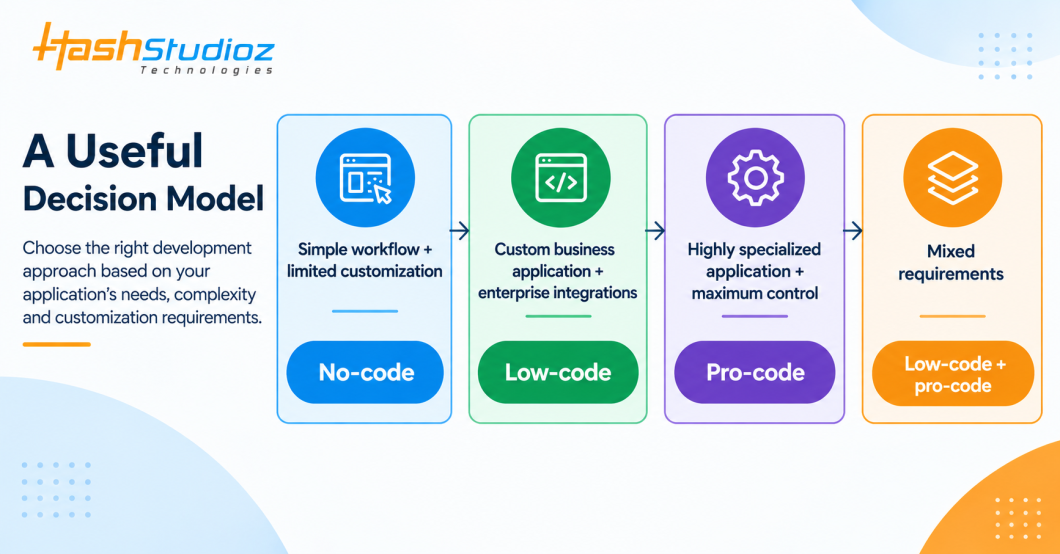
Organizations that need a fully custom application can also evaluate Custom Enterprise Application Development Services when a low-code or no-code platform cannot meet the required architecture or scalability.
Security Risks of Low-Code and No-Code Development
Reducing the amount of manual coding does not automatically make an application secure.
Low-code and no-code applications still process business data, connect to enterprise systems, and manage user permissions. Organizations therefore need security controls throughout the application lifecycle.
Important risks include:
Excessive Permissions
Applications may expose more data or functionality than a user actually needs.
Insecure Integrations
Poorly configured APIs and third-party connectors can expose sensitive information.
Shadow IT
Employees may create applications outside established IT processes, making it difficult to identify applications, data flows, owners, and security risks.
Data Exposure
Applications may connect to sensitive customer, employee, financial, or operational data without appropriate controls.
Weak Lifecycle Management
Applications created quickly can become difficult to maintain if teams do not document ownership, dependencies, versions, and deployment processes.
Platform Dependency
Organizations may become dependent on proprietary platform capabilities, connectors, or licensing structures.
Security should therefore be part of platform selection and application governance rather than something added after deployment.
Low-Code/No-Code Governance for Enterprises
Citizen development works best when business-user flexibility operates within clear enterprise guardrails.
A governance program should define:
- Who can create applications
- Which data sources can be accessed
- Which connectors are approved
- Authentication and authorization requirements
- Application classification
- Security review thresholds
- Naming conventions
- Development and production environments
- Deployment processes
- Application ownership
- Data retention policies
- Monitoring requirements
- Backup and recovery
- Application retirement
- Support responsibilities
For larger organizations, a Center of Excellence (CoE) can provide the operating model for citizen and professional development.
A CoE can maintain approved components, review applications, establish development standards, monitor platform usage, support makers, and identify applications that should move from citizen development into formal engineering ownership.
How AI Is Changing Low-Code and No-Code Development
AI is becoming part of the low-code development workflow.
Instead of relying exclusively on visual components, users can increasingly describe application requirements in natural language and use AI-assisted tools to generate application structures, formulas, workflows, documentation, test scenarios, and other development artifacts.
AI can contribute to low-code development in several areas:
- Natural-language application creation
- AI-assisted workflow design
- Code and formula generation
- Automated documentation
- Test generation
- Data transformation
- Natural-language querying
- AI-powered business applications
- AI agents
- Intelligent process automation
This does not mean AI eliminates the need for software engineering.
Enterprise applications still require architecture, data modeling, security, testing, integration design, observability, governance, and human review.
For organizations building AI-enabled enterprise applications beyond platform-native capabilities, AI and Generative AI Development Services can support custom LLM applications, RAG systems, AI assistants, machine learning solutions, and intelligent automation.
Real-World Example: Axis Bank
Axis Bank provides an example of how low-code can operate within an enterprise governance model. According to a Microsoft customer case study published in February 2026, the bank established a Power Apps Centre of Excellence and built more than 120 solutions used by more than 50,000 employees over two years. The bank also reported a 40% reduction in operational latency across its Power Platform ecosystem, with more than 100,000 transactions processed each month.
The case is particularly relevant because the implementation was not simply about allowing employees to create applications. Axis Bank combined low-code development with standardized components, governance, application lifecycle management, reusable engineering practices, and secure integrations.
This illustrates an important enterprise principle: low-code delivers more value when application development, engineering controls, and governance operate together.
How to Measure the ROI of Low-Code and No-Code Development
Organizations should measure low-code and no-code initiatives using business and engineering metrics rather than application counts alone.
Useful metrics include:
| Metric | What It Measures |
|---|---|
| Time to production | How quickly an application reaches users |
| Development hours | Engineering effort required |
| Cost per application | Delivery cost compared with alternatives |
| Manual hours saved | Reduction in repetitive work |
| Process cycle time | Change in workflow completion time |
| Application adoption | Whether users actually use the solution |
| Defect rate | Quality of delivered applications |
| Maintenance effort | Ongoing engineering requirements |
| Developer capacity | Engineering time redirected to complex work |
| Integration effort | Cost and effort of connecting enterprise systems |
A documented example demonstrates why measurable outcomes matter. Microsoft reports that L’Oréal Americas developed a purchasing application with SAP integration using Power Platform and estimated that the application reduced the time required for purchase-order processing by up to 90%, with the US division reporting hundreds of thousands of dollars in annual processing-cost savings.
Organizations should still validate these outcomes against their own application scope, baseline processes, platform costs, and implementation model rather than assuming that the same results will occur in every deployment.
Challenges Of Low-Code And No-Code Platforms
Despite their advantages, low-code and no-code platforms are not suitable for every application.
1. Limited Customization
No-code platforms can restrict access to underlying application logic, making highly customized functionality difficult.
2. Platform Lock-In
Applications may depend heavily on proprietary components, data models, connectors, and runtime environments.
3. Governance Complexity
A large number of citizen-developed applications can create ownership, security, compliance, and maintenance challenges.
4. Integration Limitations
Some applications may require integrations that are not supported natively by the selected platform.
5. Performance Constraints
Applications with high transaction volumes or specialized performance requirements may need architecture beyond the platform’s standard capabilities.
6. Technical Debt
Rapid application creation can create technical debt if teams do not establish standards for architecture, documentation, testing, ownership, and retirement.
7. Licensing Costs
Low-code does not necessarily mean low total cost. Licensing, premium connectors, environments, users, data consumption, integrations, and support can significantly affect the total cost of ownership.
The most effective strategy is therefore to match the platform and development model to the application’s actual requirements.
The Future Of Low-Code/No-Code Application Development
Low-code and no-code development are becoming part of a broader application development ecosystem rather than replacing traditional software engineering.
Three trends are particularly important.
AI-Assisted Development
AI is increasingly being integrated into application builders to help users create applications, workflows, code, documentation, tests, and agents.
Fusion Development
Business users, professional developers, architects, data specialists, and security teams are increasingly working together instead of treating citizen development and professional development as completely separate activities.
Governed Citizen Development
Enterprises are moving toward governance models that allow business teams to solve smaller problems while IT maintains control over security, data, architecture, compliance, and application lifecycle management.
The future is therefore less about choosing between “no-code” and “traditional coding” and more about creating a development model in which each approach is used where it provides the appropriate balance of speed, flexibility, control, and risk.
Low-Code and No-Code Development Services by HashStudioz
Choosing a development approach requires more than selecting a visual application builder. Enterprises need to consider application architecture, integrations, security, data, governance, scalability, and long-term maintenance.
HashStudioz helps organizations evaluate and implement application development approaches based on their business and technical requirements. Our capabilities include custom software development, web and enterprise application development, API and system integration, workflow automation, AI development, cloud implementation, application modernization, and enterprise application development.
The objective is to select the right balance between low-code, no-code, and traditional development rather than forcing every application into a single development model.
Conclusion
Low-code and no-code development platforms provide organizations with alternative ways to build applications using visual development, reusable components, workflow automation, integrations, and increasingly AI-assisted capabilities. No-code is generally suited to simpler applications and workflows where speed and accessibility are important. Low-code provides greater customization and can support more complex enterprise requirements while still reducing the amount of manual development required. For enterprise adoption, the development approach should be evaluated against application complexity, integration requirements, security, governance, scalability, lifecycle management, platform dependency, and total cost of ownership.
The most practical strategy is rarely to choose low-code, no-code, or traditional development exclusively. Organizations can combine these approaches to give business teams faster ways to solve suitable problems while professional developers focus on applications that require deeper engineering expertise and control.
As AI becomes increasingly integrated into development platforms, low-code and no-code will continue to evolve. Their long-term value will depend not only on how quickly teams can build applications, but also on how securely, reliably, and sustainably those applications can operate at enterprise scale.
Frequently Asked Questions
1. What are low-code and no-code development platforms?
Low-code and no-code development platforms are software development environments that use visual interfaces, reusable components, workflows, templates, integrations, and automation to reduce the amount of traditional programming required to build applications.
2. What is the difference between low-code and no-code?
Low-code platforms allow minimal coding and generally provide greater customization and extensibility. No-code platforms are designed for building applications without traditional programming, but they typically provide less flexibility for complex business logic and advanced customization.
3. Can low-code platforms replace traditional software development?
No. Low-code can reduce development effort for suitable applications, but traditional development remains important for highly customized, performance-sensitive, specialized, or technically complex systems. Many enterprises use low-code alongside professional software development.
4. Are low-code and no-code platforms secure?
They can be secure when organizations configure the platform and applications correctly. Enterprises should still implement identity and access controls, data protection, API security, monitoring, testing, governance, and compliance processes.
5. What can you build with low-code and no-code platforms?
Common applications include workflow automation systems, internal business applications, approval workflows, portals, forms, dashboards, mobile applications, customer-service tools, data collection applications, and process automation solutions.
6. How is AI changing low-code and no-code development?
AI is making low-code and no-code development more capable through natural-language application creation, AI-assisted workflow design, code and formula generation, automated documentation, testing, data transformation, AI-powered applications, and AI-agent development. Human oversight remains important for architecture, security, governance, testing, and production deployment.